What is MCP? A Beginner's Guide
Understanding Model Context Protocol and why it suddenly matters. From copy-paste hell to seamless automation with AI agents.
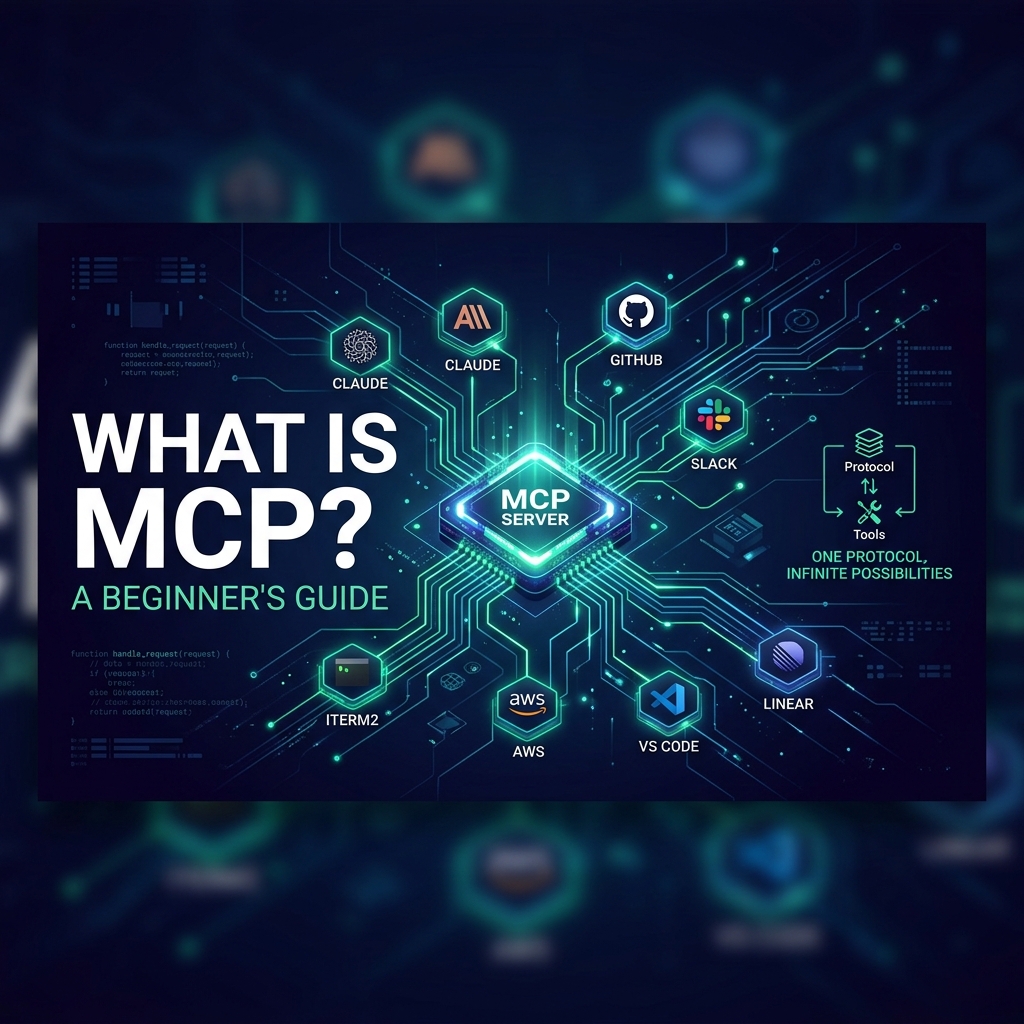
About 4 to 5 months ago, before I even knew what MCP was, my workflow was a complete manual marathon. Whenever I had a project idea, I would submit it to Claude to help build an MVP and ask for chunks of GitHub issues. I had to manually create every single one of those issues, then copy-paste the descriptions into Antigravity IDE to actually write the code. Finally, I would copy all those issues into a Notion kanban board just to track my progress.
It was a constant cycle of switching tabs and shuttling text like a human clipboard. Then I started seeing posts on Instagram and Twitter about something called MCP, and it sounded like the bridge I was missing. I dug in, set it up, and it clicked faster than I expected. Let me break it down.
What is MCP? (The Actually Simple Explanation)
Forget the acronym for a second. Let me describe the problem first.
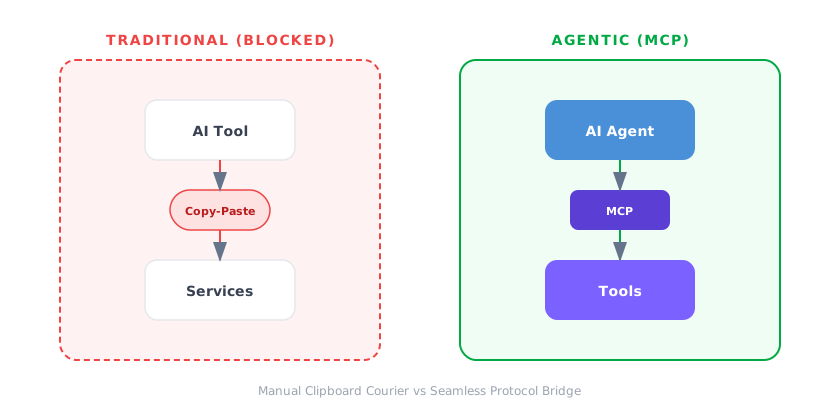
Right now, AI tools like Claude or Antigravity IDE are “behind glass.” They can think and reason, but they cannot actually touch your tools. They give you a block of code, and then you have to carry that code to GitHub, Notion, or Slack. You are basically a courier service for your AI.
This is wasteful. The AI figures out the answer, then sits there while you play copy-paste telephone.
MCP (Model Context Protocol) fixes this. It is a standard that lets AI tools talk directly to your favorite services. Instead of pushing data to your clipboard so you can pull it into GitHub, the AI just writes to GitHub directly.
Think of it like the USB port for AI. Before USB, every device had a different connector. USB standardized the “socket” so any device could talk to any computer. MCP does the same for AI agents and external data sources. Whether you use Claude, Antigravity IDE, or Cursor, they can all use the same “plugs” to connect to GitHub, Notion, or your local files.
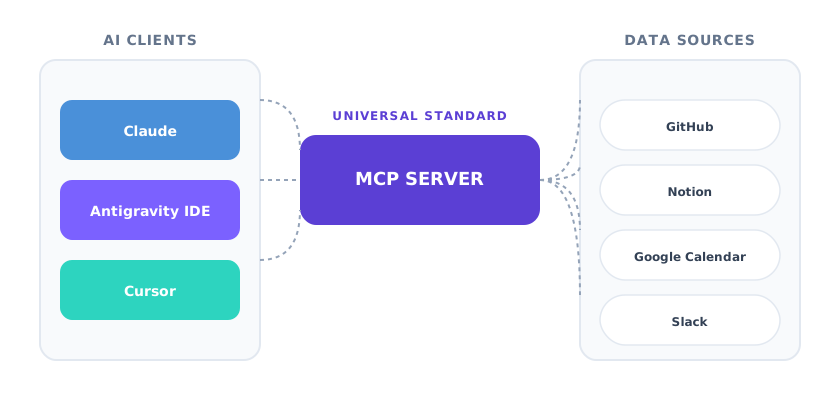
For years, AI was just a smart chat box. Now it is becoming agentic. An advisor tells you how to do something; an agent actually does it. But an agent without tools is like a chef without a kitchen.
Think of it this way: an AI that can plan your architecture but cannot touch your GitHub repo is just a smart passenger in your car. It can tell you where to turn, but it cannot grab the steering wheel. MCPs give the AI the steering wheel.
This allows agents to:
- Review PRs and suggest fixes without you copying a single line of code.
- Trace bug reports to source code and ping the team on Slack automatically.
- Analyze database logs and suggest optimizations directly.
Standardizing how agents connect to tools moves us past one-off integrations. Once a service builds an MCP server, any AI agent can use it immediately. This is a massive paradigm shift. We are moving from a world where AI simply “recommends” a solution to a world where it “implements” it. In the legacy workflow, you were the bridge; in the MCP workflow, the protocol is the bridge. This allows you to stay in the “flow state” for hours at a time because you aren’t constantly context-switching to handle the administrative overhead of coding.
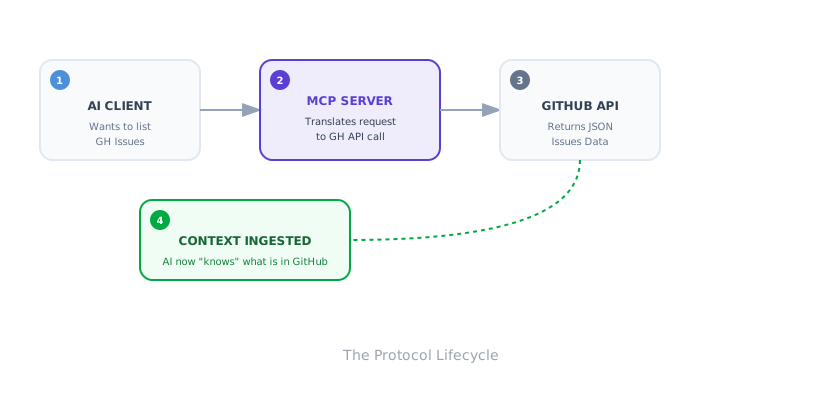
Here is how I use this every day to save hours of context-switching.
When I work on a feature, I describe it to Claude. Instead of me creating issues manually, Claude uses the GitHub MCP to create it for me with a formatted title, description, and labels. When I open Antigravity IDE, it reads that issue directly via the same MCP. It already has the full context, so it creates an implementation plan immediately.
While I code, the AI helps me build it because it knows exactly what the issue requires. Finally, I tell Claude to “update the Notion board,” and it moves the task to “Done” while linking the PR. I am still the architect making decisions, but the AI handles the boring plumbing of moving data.
Wait, can’t I just use Claude’s built-in tools or “Claude Code”? This is the most common question I get. You could use proprietary tools, but that locks you into one ecosystem—like using a charger that only works with one specific phone brand. MCP is an open standard. By using MCP with your own environment and tools like Antigravity IDE, you gain access to your local project files, private Notion databases, and internal company tools that a sandboxed cloud tool simply cannot reach. This setup gives you the freedom to use any AI tool you prefer while keeping complete control over your data and infrastructure.
The MCP Ecosystem Right Now
So what MCPs actually exist? More than you’d think. Here’s a snapshot of what’s available right now:
| MCP Server | What It Can Do |
|---|---|
| GitHub | Read and write issues, PRs, code reviews, and browse repos |
| Notion | Work with databases, pages, and update kanban boards |
| Google Calendar | Create and update events or check availability |
| Linear | Issue tracking for Linear users |
| Slack | Manage channels and send team alerts |
| File System | Read and write files on your local machine |
| Web Fetch | Read any website for research, monitoring, or scraping |
| PostgreSQL | Query databases, inspect schemas |
And these are just the public, community ones. Stripe has MCPs for their payment API, allowing you to debug transactions or check subscription statuses without leaving your IDE. Figma has MCPs for design files, so your AI can “see” the design spec while it codes the CSS. Even the big cloud players like AWS and Google Cloud are building servers for their massive infrastructures.
The real game-changer, though, is the Internal MCP Opportunity. Most developers work with proprietary systems—internal admin dashboards, siloed legacy databases, or custom CI/CD pipelines. These are usually “invisible” to AI tools because they are behind private networks and custom APIs. By wrapping these in an MCP server, you can give your AI agent the ability to query your private logs, restart your staging servers, or generate reports from your internal CRM. You aren’t just using the internet’s tools anymore; you’re building a customized AI assistant that understands your company’s secret sauce.

Common Questions (Because I Had Them Too)
“Isn’t this just an API wrapper?” Technically yes, but the magic is in the standardization. It is the difference between every restaurant inventing its own ordering system versus all of them using the same Universal Remote. You write one integration, and it works across every AI tool that supports the protocol. Without this standard, developers would spend half their lives writing custom “glue code” for every new AI tool that hits the market.
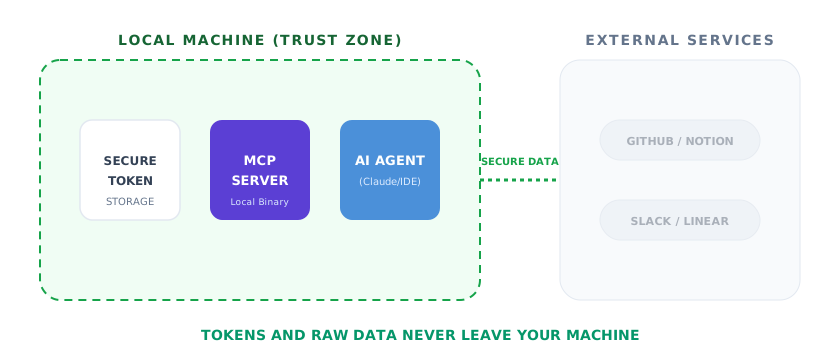
“Is this a security risk?” The MCP server runs locally on your machine, so your tokens stay with you. You control exactly what permissions the AI has, whether it is read-only access to GitHub or full write access to Notion.
“Won’t this replace developers?” No, but it will change our day-to-day. We will spend less time playing “copy-paste telephone” and more time on actual architecture and design. The AI handles the plumbing; you handle the vision.
Why You Should Care
We are at an inflection point. AI is shifting from answering questions to executing work. Every major player (Anthropic, Google, AWS) is investing in this protocol because it solves the biggest hurdle for agents: how to interact with the real world without a human middleman.
Six months from now, this will be the standard way dev teams operate. The teams that understand how to hook their AI into infrastructure will move significantly faster than those still switching between browser tabs.
I am planning a follow-up post next week to walk through setting this up step-by-step. If you want to jump in now, the official MCP docs are great. Once you see your AI create a GitHub issue or update a task directly, you will never want to go back.